ONE8 Stable 11 reference

Seven pages. One instrument.

A visual tour of the verified Stable 11 top-level pages, from playing a patch to building filters, movement, routing, colour, dynamics, stereo image, output safety, and signal flow.

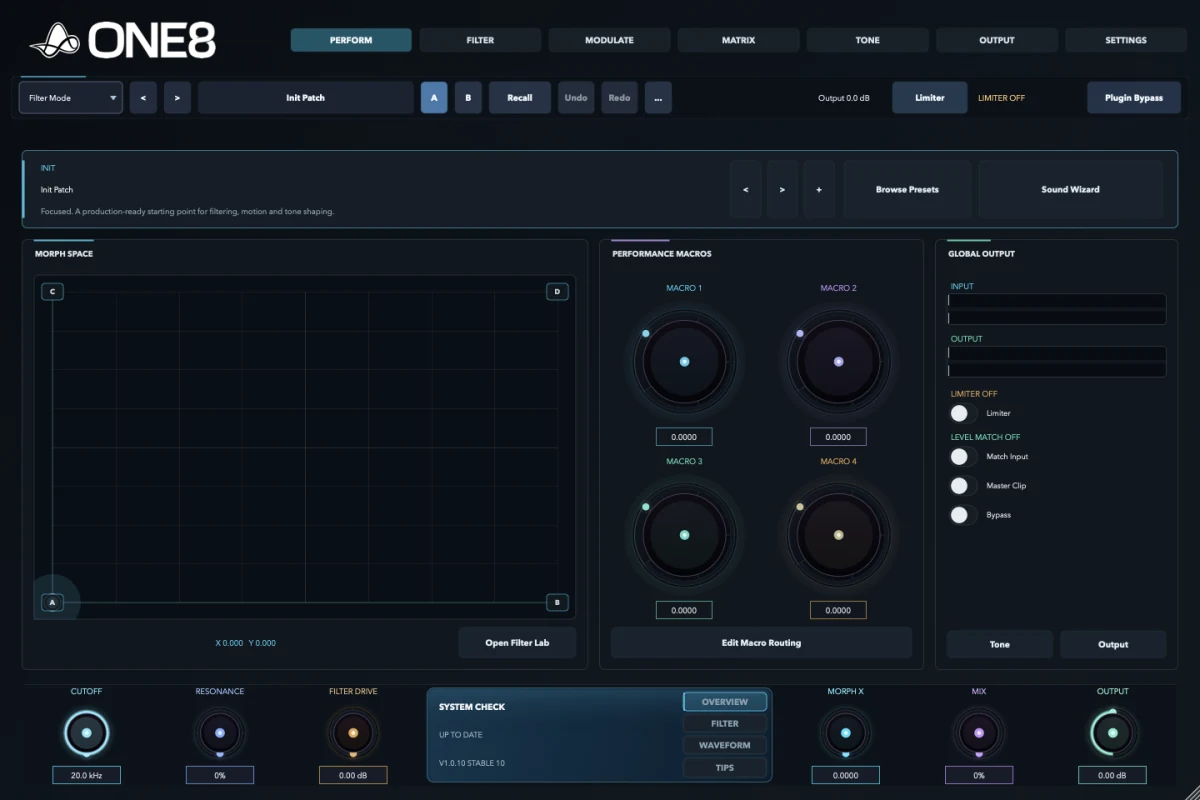
ONE8 Stable 10 Perform page

How to read ONE8

Seven jobs along one signal path.

Perform is for playing. Filter creates the states. Modulate creates movement. Matrix explains the routes. Tone shapes character and response. Output proves the result. Settings controls behaviour, performance, licensing, and processing order. Global preset, A/B, undo, limiter, bypass, and final macro controls remain accessible throughout the interface.

01 · Perform

Turn the finished patch into something you can play.

Perform gathers the decisions that matter during writing, recording, and automation. It keeps deep editing out of the way while exposing the patch's morph space, macros, preset tools, and output confidence.

What it does

Presents the patch as an instrument with a morph field, four macros, preset navigation, and global level tools.

How to use it

Choose a preset, move through the morph space, then record macro or morph automation as part of the performance.

Why use it

It turns a complex modulation system into a small set of repeatable musical gestures.

ONE8 Stable 10 Perform page

Preset strip

Move between patches and manage the current sound without leaving Perform.

  • Previous and next preset
  • Favourite
  • Browse Presets
  • Sound Wizard
  • Patch name and recall state

Morph space

The playable surface for moving between the filter states and modulation character stored in a patch.

  • X position
  • Y position
  • Z position
  • Intensity
  • Time / lag
  • Engine or mode state

Performance macros

Four patch-defined controls for the changes worth playing or automating most often.

  • Macro 1
  • Macro 2
  • Macro 3
  • Macro 4
  • Assignable names and destinations

Global output

Level and safety controls remain visible while auditioning and recording.

  • Input and output meters
  • Limiter
  • Match Input
  • Master Clip / safety
  • Plugin Bypass
Complete Perform option group

Preset previous/next, favourite, Browse Presets, Sound Wizard, patch name, morph X/Y/Z, intensity, time, engine or mode, Macros 1-4, input and output meters, Limiter, Match Input, Master Clip, Plugin Bypass, A/B state, Recall, Undo, Redo, and quick links to Tone and Output.

02 · Filter

Build the states that the movement will travel through.

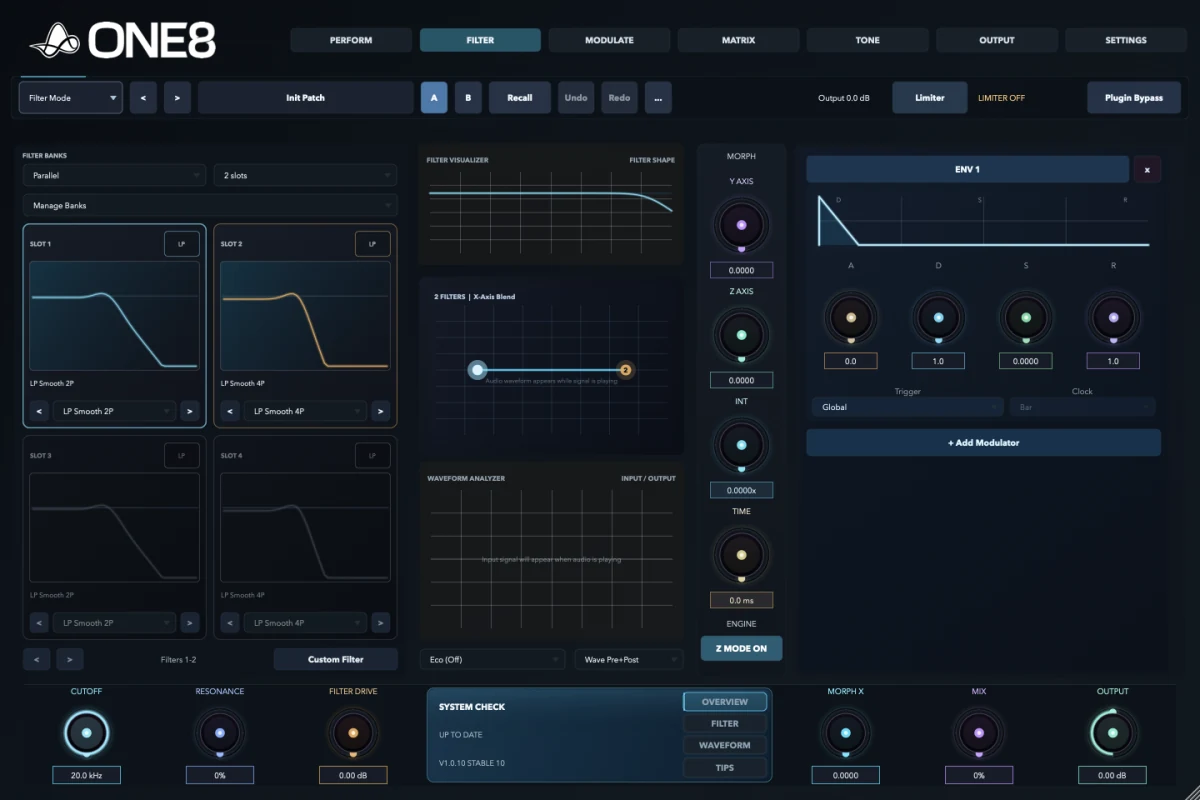
Filter is the tonal core. Choose how many filters participate, how they are routed, which response each slot uses, and how the X/Y/Z morph engine moves between them. Visualizers show both the designed response and the signal travelling through it.

What it does

Creates a bank of two, four, or eight filter states and a continuous space between them.

How to use it

Choose routing and models, tune each slot, then set morph coordinates, intensity, time, and quality.

Why use it

One motion can change response shape, resonance, character, and routing instead of merely sweeping cutoff.

ONE8 Stable 10 Filter page

Filter bank

  • 2, 4, or 8 slots
  • Serial, Parallel, Split, or Mid-Side routing
  • Manage Banks
  • Slot previous/next
  • Custom Filter editor

Slot controls

  • Filter model
  • Per-slot response display
  • Per-slot enable and selection
  • Model-specific parameters
  • Slot order and active bank

Analysis

  • Filter Visualizer
  • Filter Shape display
  • Waveform Analyzer
  • Pre, post, or combined signal view
  • Quality / analyzer mode

Morph and global filter

  • Morph X, Y, and Z
  • Intensity
  • Time / lag
  • Engine, Retro, or Z mode
  • Cutoff, Resonance, Filter Drive, Mix, and Output
  • Visible modulator dock
All 93 filter models and Custom Drawn

Core / EQ Legacy · 24

LP Smooth 2P, LP Smooth 4P, LP Tight 2P, LP Tight 4P, HP Clean 2P, HP Clean 4P, HP Tight 2P, HP Tight 4P, BP Wide, BP Narrow, BP Dual, BP Focus, Notch Wide, Notch Narrow, Notch Dual, Notch Deep, Peak Soft, Peak Sharp, Shelf Low, Shelf High, Hybrid Tilt, Hybrid Hollow, Hybrid Punch, Hybrid Air.

Core / EQ Modern · 22

LP 6 dB, LP 12 dB, LP 18 dB, LP 24 dB, LP 36 dB, LP 48 dB, HP 6 dB, HP 12 dB, HP 18 dB, HP 24 dB, HP 36 dB, HP 48 dB, Band-pass, Notch (Narrow), Band-stop (Wide), All-pass, Peaking-Bell, Low Shelf, High Shelf, Tilt EQ, Brickwall LP, Brickwall HP.

Analog / Character · 6

SVF LP-BP-HP Morph, Transistor Ladder, Diode Ladder, SEM-style, Sallen-Key style, MS-20 HP-LP Pair.

Creative / Modulation · 8

Comb (Feedforward), Comb (Feedback), Formant-Vowel, All-pass Chain, LP-BP-HP Morph, Twin-peak Dual-peak, Resonator Bank, Auto-wah Envelope BP.

Dynamic / Utility · 8

Dynamic Filter, Sidechain-reactive Filter, M-S Filter Mode, Multiband 2-band, Multiband 3-band, Multiband 4-band, Linear-phase Mode, Minimum-phase Mode.

Content-focused · 12

Vocal Focus, Vocal Air, Vocal De-ess Notch, Bass Tight, Bass Sub-Clean, Bass Growl, Lead Presence, Lead Bite, Pad Warm, Pad Wash, Pad Air, Pad Motion.

Creative / Legacy extras · 12

Comb FF Short, Comb FF Long, Comb FB Short, Comb FB Long, Phaser 4, Phaser 6, Phaser Deep, Phaser Wide, Formant 1, Formant 2, Formant 3, Formant 4.

Custom · 1

Custom Drawn lets the response become a shape made for the patch rather than a fixed model.

03 · Modulate

Create motion that belongs to the phrase.

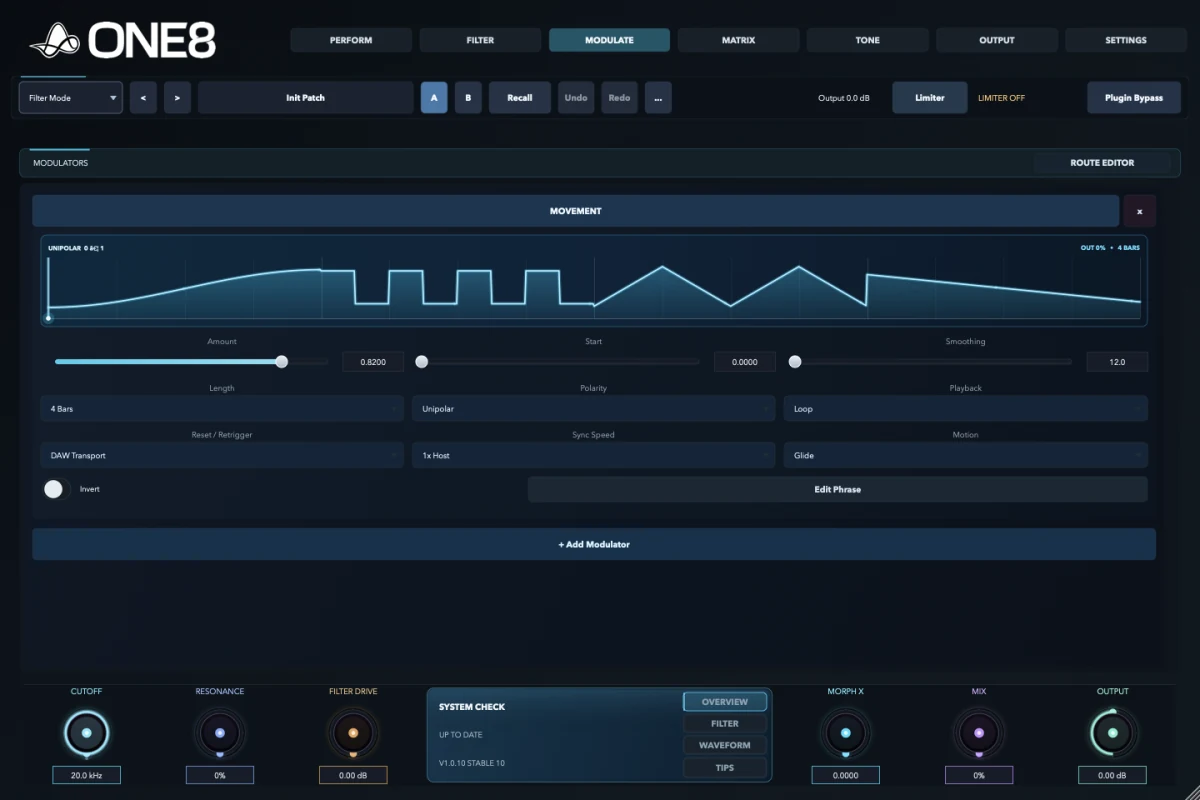
Modulate holds periodic, envelope-driven, audio-reactive, drawn, stepped, scene-based, and MIDI performance sources. The Route Editor turns the selected source into a clearly scoped destination assignment.

What it does

Generates and processes the control signals that move filters, tone stages, stereo controls, and output parameters.

How to use it

Choose a source, shape timing and response, then route it with range, curve, and depth.

Why use it

Different musical jobs need different motion: repeating, one-shot, played, followed, sequenced, or blended between scenes.

Oscillators and envelopes

  • LFO 1, LFO 2, LFO 3
  • ENV 1, ENV 2, ENV 3
  • Movement and custom shape
  • Step Sequencer
  • Automation source

Reactive and performance sources

  • Follower
  • Trigger
  • MIDI gate
  • Velocity and key
  • Pitch Bend and Mod Wheel
  • Aftertouch and Sustain

Control layers

  • Macro 1-4
  • Bus 1-4
  • Processor 1-4
  • Scenes A, B, and C
  • Scene morph
  • Cutoff and Resonance pre/post taps

Route Editor

  • Source
  • Destination
  • Depth or amount
  • Curve
  • Range / min-max
  • Route information
Complete Modulate source and tool group

LFO 1-3, ENV 1-3, Movement, Custom Shape, Step Sequencer, Automation, Follower, Trigger, Macro 1-4, Bus 1-4, Processor 1-4, Scene A/B/C and scene morph, MIDI Gate, Velocity, Key, Pitch Bend, Mod Wheel, Aftertouch, Sustain, Cutoff and Resonance pre/post taps, plus Source, Destination, Depth, Curve, Range, and Info in the Route Editor.

04 · Matrix

Make complex routing readable.

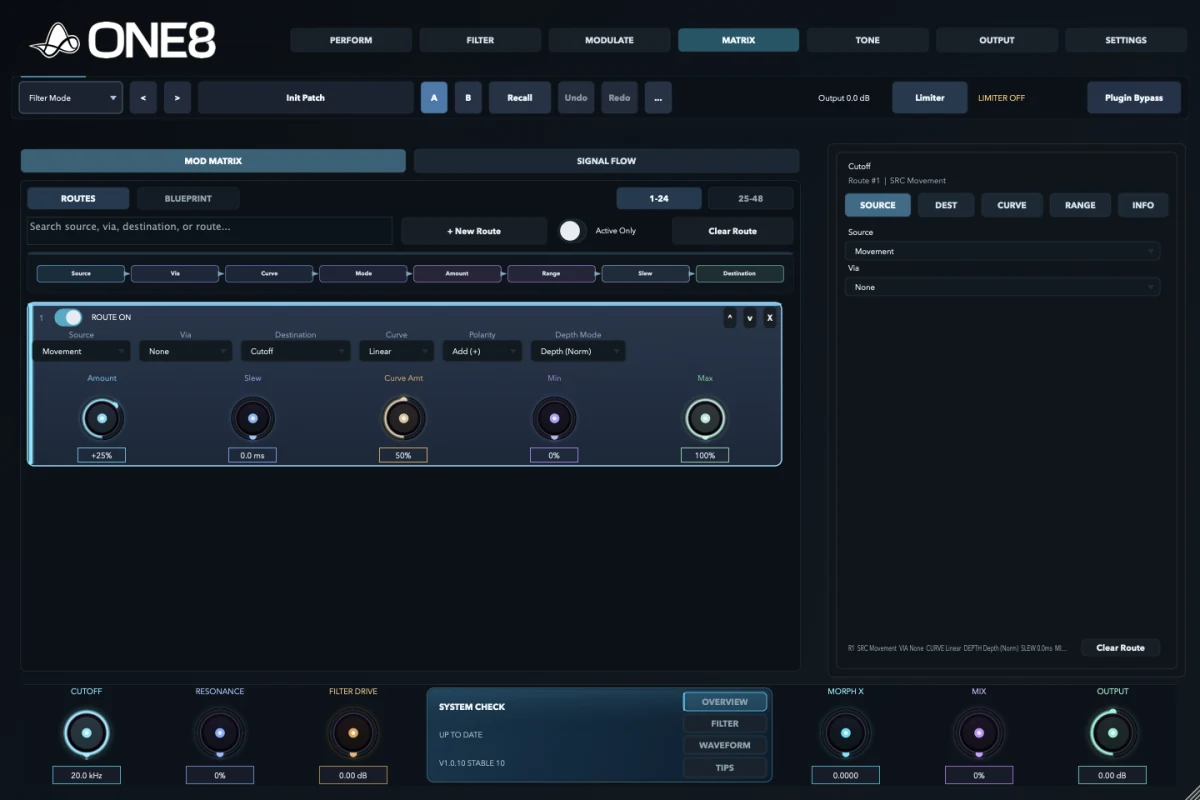
Matrix is the audit view for movement. Routes is precise and compact; Blueprint shows the same assignment as a signal relationship; Signal Flow places those decisions inside the complete processing path.

What it does

Displays up to 24 modulation routes with their complete behaviour.

How to use it

Build and edit in Routes, use Blueprint for one assignment, then check Signal Flow for processing context.

Why use it

It makes diagnosis, restraint, and intentional movement possible in a busy patch.

Route definition

  • Source
  • Destination
  • Depth or absolute amount
  • Polarity
  • Via source

Route response

  • Curve
  • Range and min-max
  • Slew
  • Enable state
  • Processing order

Views and management

  • Routes 1-24 and 25-48 banks
  • Blueprint
  • Signal Flow
  • Route inspector
  • Clear route
  • Enable and delete route

Production use

Limit a macro to a useful range, soften a stepped source with slew, invert a follower, or add a via source so one control scales another.

Complete Matrix option group

Routes, Blueprint, and Signal Flow; route banks 1-24 and 25-48; Source, Via, Destination, Curve, Polarity, Depth Mode, Amount, Range, Minimum, Maximum, Slew, Enable, and Order; route inspector; Clear Route; and Delete Route. Signal Flow shows Input Trim/Pan, Filter Drive, Filter/Morph, Sidechain/Dynamics, Overdrive, Stereo Imaging, Clip, Output Trim/Pan, Limiter/Safety, and Match Input.

05 · Tone

Choose where the movement gains character.

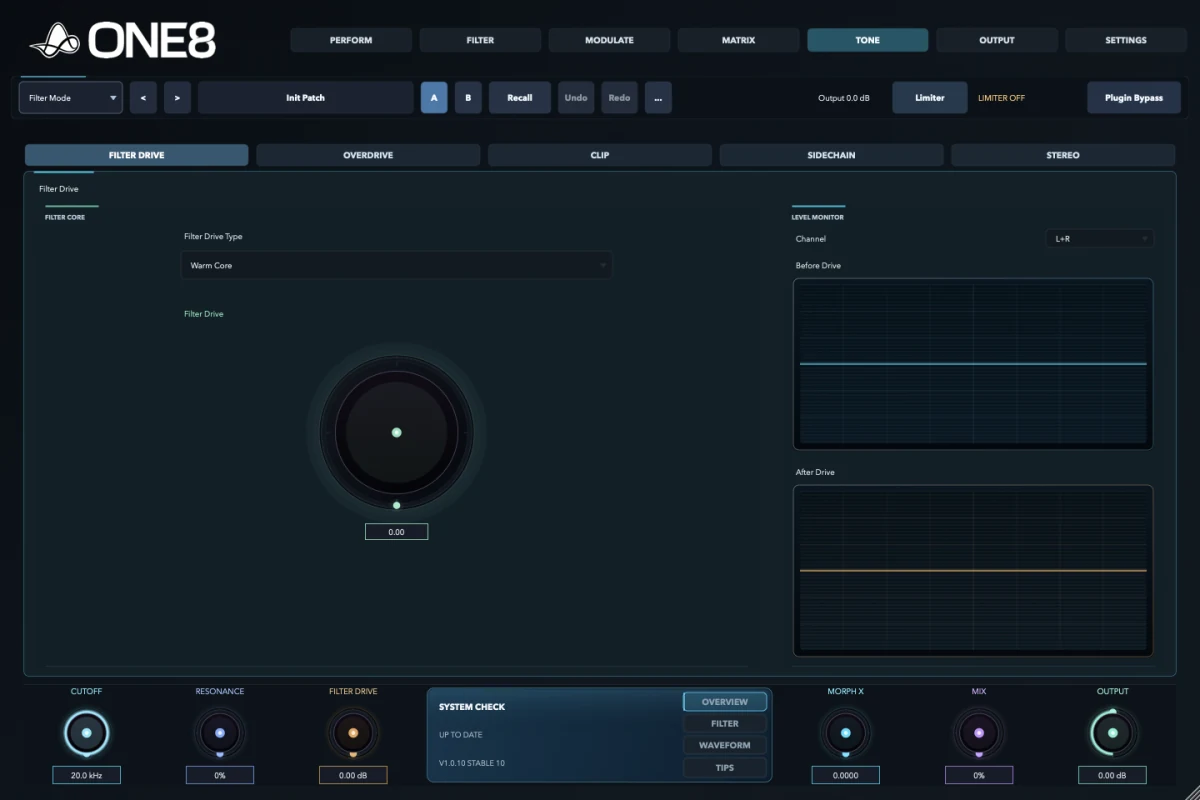
Tone separates colour, clipping, dynamics, and stereo image into focused subviews. Filter Drive acts at the filter core; Overdrive colours after filtering; Clip controls peaks; Sidechain creates external or internal response; Stereo shapes width and placement.

What it does

Adds harmonic character, controlled clipping, signal-reactive movement, and stereo shaping around the filter engine.

How to use it

Choose the stage by function, set its character, and use Matrix Signal Flow to keep its position in the full chain visible.

Why use it

Drive before and after a moving filter behaves differently; detector placement and stereo order matter just as much.

Filter Drive and Overdrive

  • Warm Core
  • Smooth Core
  • Edge Core
  • Tube Core
  • Console Core
  • Hybrid Core
  • Tape Core
  • Diode Core
  • Transformer Core

Clip

  • Final Clip
  • Band A, B, and C
  • Soft Clip
  • Clip Distortion
  • Diode Clip
  • Digital Hard
  • Hybrid Clip

Sidechain

  • Detector, Targets, and Detail
  • Full or Split mode
  • Clean, Punch, Smooth, Bounce, or Glue response
  • Main or Sidechain Sum, Left, or Right source
  • 12, 24, 36, or 48 dB/oct slope
  • 1-4 detector peaks

Stereo

  • Vector, Lissajous, or Bars view
  • Image or Band Split mode
  • Width
  • Rotation
  • Asymmetry
  • Low/high split
  • Auto Narrow
Complete Tone tab and subview group

Filter Drive, Overdrive, Clip, Sidechain, and Stereo. Clip includes Final, Band A, Band B, and Band C with Soft Clip, Clip Distortion, Diode Clip, Digital Hard, and Hybrid Clip. Sidechain includes Detector, Targets, and Detail; Full/Split; Clean/Punch/Smooth/Bounce/Glue; Main or Sidechain Sum/Left/Right; 12/24/36/48 dB/oct; and 1-4 peaks. Stereo includes Vector/Lissajous/Bars, Image/Band Split, Width, Rotation, Asymmetry, low/high split, and Auto Narrow.

06 · Output

Finish the signal and inspect what really changed.

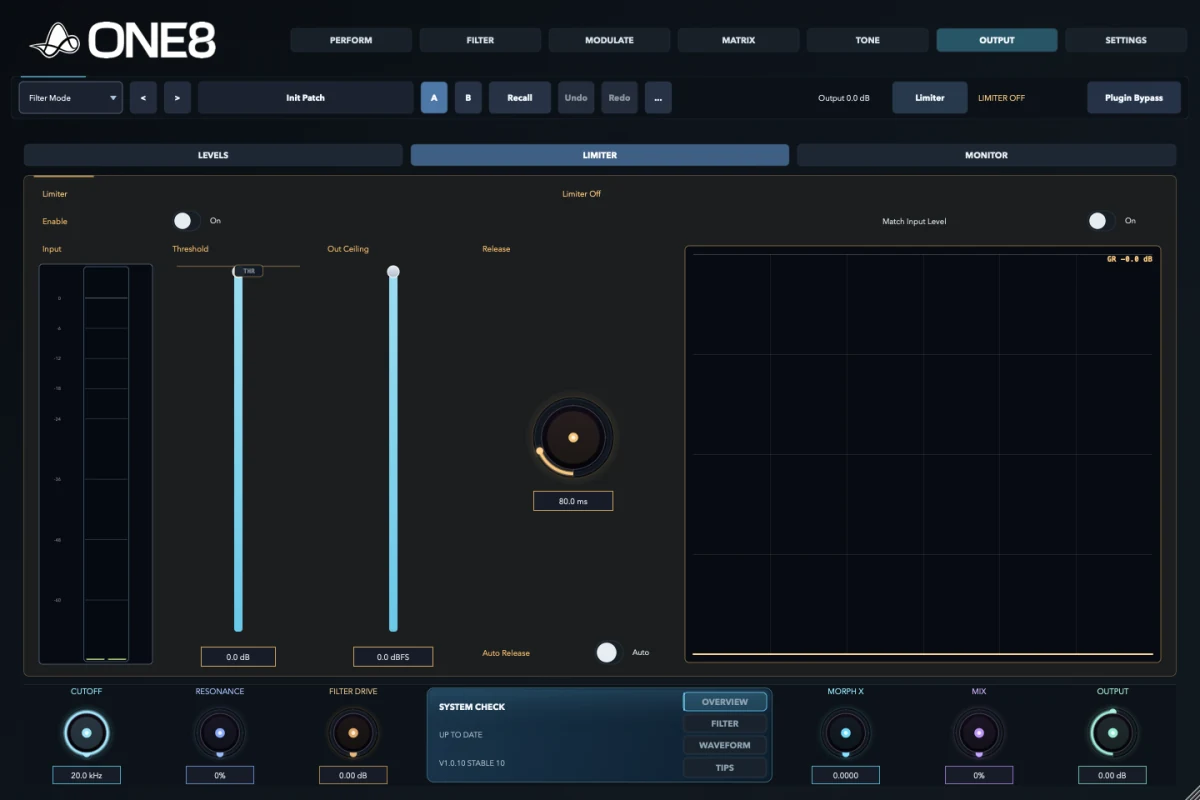
Output brings gain staging, limiting, loudness-matched comparison, safety, and visual monitoring together. Delta monitoring isolates the change introduced by ONE8; stereo views expose phase and image behaviour.

What it does

Controls final level, protection, stereo monitoring, and fair comparison.

How to use it

Set levels first, configure Limiter and SAFE, use Match Input, then inspect Output or Delta.

Why use it

Louder often sounds better; matched comparison and delta monitoring reveal the actual processing decision.

Levels

  • Input and output meters
  • Input and output trim
  • Input and output pan
  • Mono control
  • Match Input

Limiter

  • Limiter input
  • Threshold
  • Output level
  • Release
  • ARC
  • SAFE

Monitor source

  • Off
  • Input
  • Output
  • Delta

Stereo monitor

  • Vector
  • Lissajous
  • Bars
  • Input meter
  • Output meter
  • Width and correlation
Complete Output option group

Levels, Limiter, and Monitor; input/output meters, trim, pan, and stereo controls; Limiter input, Match Input, threshold, level, release, ARC, and SAFE; monitor Off/Input/Output/Delta; Vector, Lissajous, and Bars; plus width and correlation monitoring.

07 · Settings

Control the environment around the sound.

Settings covers visual behaviour, help level, processing quality, latency, performance, version management, and licensing. Signal Flow now lives in Matrix beside the route views.

What it does

Configures ONE8 itself rather than the current sound alone.

How to use it

Choose visual and performance preferences, confirm the installed build, then activate or remove the licence.

Why use it

Tracking, sound design, and final rendering need different CPU, latency, visualizer, and help choices.

General

  • Render Visualizer
  • Visualizer mode: Filter Shape
  • Show Tooltips
  • LED Help: Off, Beginner, Semi-Pro, Pro
  • Quality: Eco, 2x, 4x
  • Ultra Low Latency
  • Clear Morph Trail
  • CPU, memory, and latency meters

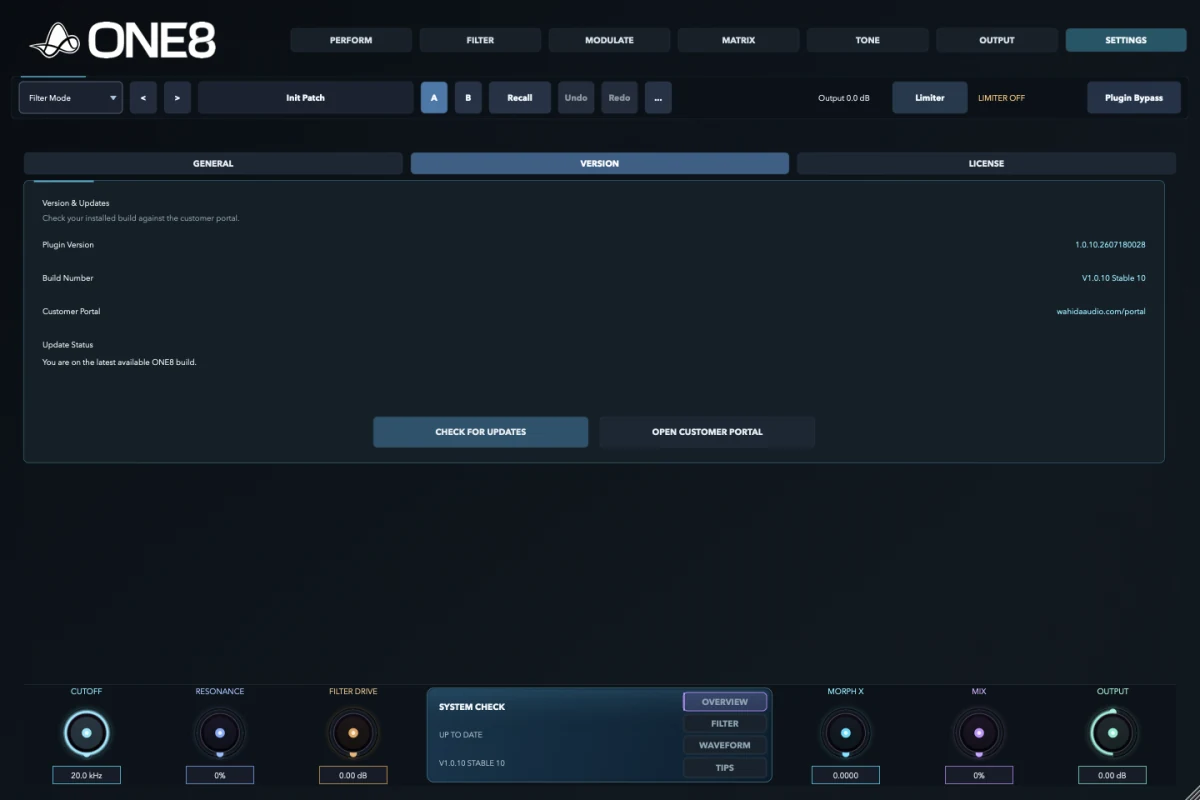
Version

  • Build and release information
  • Customer portal
  • Check for update
  • Download update

License

  • Serial entry and reveal
  • Activate
  • Remove licence
  • Machine and status information
  • Portal and website links

Performance monitor

  • CPU load
  • Host process memory
  • Current latency
  • Visualizer render state
  • Ultra Low Latency
Complete Settings group

General, Version, and License; Render Visualizer; Visualizer Mode; Show Tooltips; LED Help detail; Quality Mode; Ultra Low Latency; Clear Morph Trail; CPU load; host process memory; current latency; build and release information; Check for Updates; Customer Portal; serial entry and reveal; activation status; Activate; and Remove License.

Design lineage

Where these ideas came from.

ONE8 is a modern digital instrument, not a circuit emulation. Its workflow brings together several established ideas from subtractive synthesis, control routing, multidimensional morphing, MIDI performance, and contemporary sidechain and stereo production.

Voltage-controlled filtering

Early voltage-controlled filters made timbre performable: a control voltage could move cutoff and resonance instead of leaving tone fixed. ONE8 extends that production idea from one swept response to a bank of filter states.

Control networks and matrices

Modular synthesizers established the source-to-destination patch. Later digital interfaces made many such routes storable. ONE8's Matrix keeps source, destination, range, curve, polarity, via, and slew visible together.

Multidimensional morphing

Digital audio systems made interpolation between timbral states practical. ONE8's X/Y/Z system belongs to that broader morphing lineage, while using its own filter bank, movement sources, and engine design.

MIDI as performance control

MIDI standardised keyboard, controller, and continuous-control messages between instruments. ONE8 treats velocity, key, pitch bend, mod wheel, aftertouch, sustain, and automation as movement sources.

Sidechain and envelope following

Level detectors have long allowed one signal to control another. In ONE8, Follower, Trigger, detector filtering, response shapes, and target selection turn that studio technique into part of the filter performance.

Modern finishing and proof

Loudness matching, delta listening, vector scopes, multiband image control, limiting, and safety belong to modern production practice. They are included so movement can be judged and delivered without a separate inspection chain.

Primary historical and technical references

ONE8

Build the filter. Play the movement.

Try the complete instrument, or keep the illustrated manual nearby while you work.